
• Ntc
  • Ncell
  • Samsung
  • Apple
  • Xiaomi
  • 2G to 5G
  • ISP
  • NTA
  • Tariffs
  • About us
Friday, October 16, 2026
NepaliTelecom
  • Home
  • Telecom News
    • News
    • NTA
    • Ntc
    • Ncell
    • Smart Cell
    • Digital Nepal
  • Gadgets
  • How To
  • SpeedTest
  • Contact
  • About
No Result
View All Result
  • Home
  • Telecom News
    • News
    • NTA
    • Ntc
    • Ncell
    • Smart Cell
    • Digital Nepal
  • Gadgets
  • How To
  • SpeedTest
  • Contact
  • About
No Result
View All Result
NepaliTelecom
No Result
View All Result

Home » How To » How to cut a regular SIM and Micro SIM to a nano SIM in Nepal?

How to cut a regular SIM and Micro SIM to a nano SIM in Nepal?

NepaliTelecom by NepaliTelecom
July 2, 2024
in How To
Reading Time: 3 mins read
SIM cards
Follow us on

Last Updated on July 2, 2024

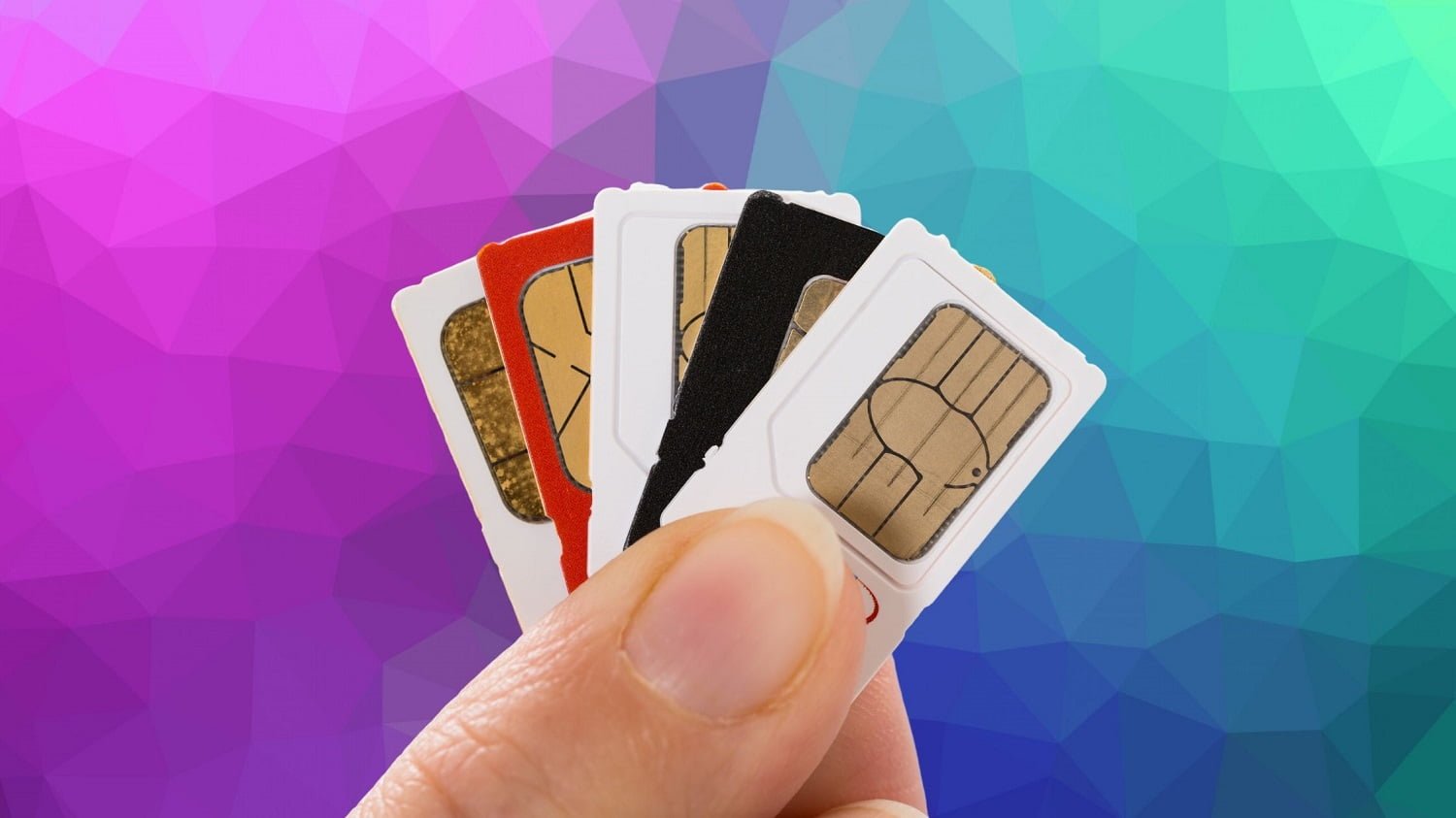
People fond of using new smartphones, were much worried when Apple’s iPhone 5 is known to only support nano-SIM (4ff) and the media including Nepalitelecom.com reported news ruling out the prompt usability of phones beyond iPhone 5 in Nepal. After that, nano-SIM became so popular that people kept on asking if it is possible to cut regular SIM/Micro SIM to nano-SIM. Nano Sim is not only shorter and narrower but also quite thinner to the regular SIM with dimensions of 12.3 × 8.8 × 0.67 mm. 

Now that everybody knows the possibility to make a nano-SIM out of regular or Micro SIM, here is the complete procedure to cut into a nano-SIM compatible for the latest iPhone.

Process to cut regular sim into a nano SIM.

Step 1: Print the picture here at 100% scale on an A4 page.
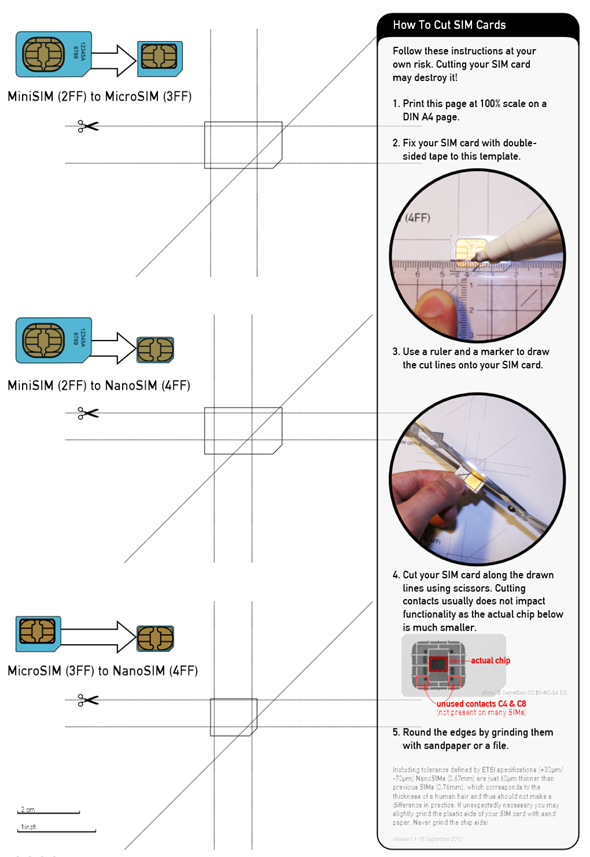
How to cut Nano SIM

Step 2: Place your current SIM card (Mini or Micro) on the designated area. If you have a Mini SIM, place it in the second highlighted area. If you have Micro SIM, place it on the third and last.

Step 3: Firmly stick your SIM to the highlighted outline using a piece of tape. Be sure to align the edges properly.
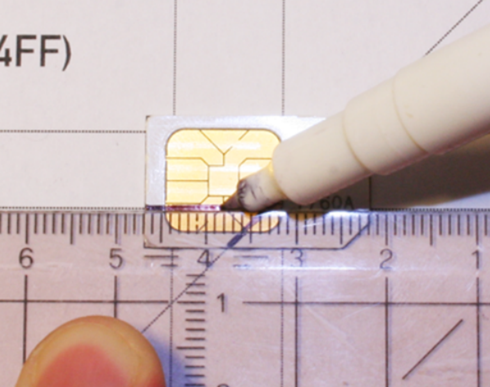
20120921133818155

Step 4: Use a ruler + marker to accurately mark the five lines along which you have to cut.

Step 5: Cut it! Be very careful. Take things slowly. You may damage your card if this is not done properly.
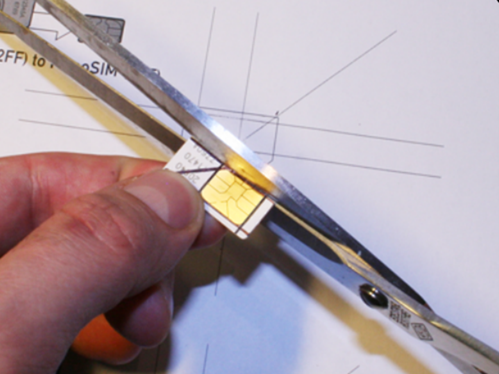
20120921133715119

Step 6: Smooth out the edges of your freshly-cut Nano SIM (nonmetal side) by using sandpaper or a file. Again, be very careful in this step as it may damage the SIM card’s circuitry if you sand the SIM more than needed.

Be extremely careful when you do the above procedure, there may be chances of damaging your SIM and have some time to get a new SIM from the customer service center of your operator. 

These days, you do not have to cut a regular SIM card to micro or nano SIM as the telcos themselves provide 3 in 1 SIM card. Which means you can use the SIM card as regular one or Micro or Nano as per your handset requirement. If you want to change your regular SIM card to another be it micro or nano, just visit the telcos customer center and get the 3 in 1 SIM card.

Follow us on Facebook, Google News, and Viber to get the latest news, and information about Nepal Telecom, Ncell, Smart Cell, ISPs, mobile apps, and phones in Nepal.

Latest Posts

  • Verizon, Ericsson test first 6G field call in 7 GHz range
  • Huawei Hosts ISP Event 2026 to Accelerate F5G and AI-Driven Digital Transformation
  • Nepal Telecom brings cheap internet pack of Rs 4999 per year
  • vivo Y32 launched in Nepal with 8000mAh batte
  • OnePlus 16 Launched With 9,000mAh Battery, 185Hz Display
  • Nepal Telecom starts SIM home delivery by postal service
  • 10 Best Reasons You Can Choose Ntc Fiber Internet Services
Comments
Previous Post

Govt renews UTL’s license

Next Post

Teliasonera ingenious arrangement in Nepal revealed

NepaliTelecom

NepaliTelecom

Related Posts

Stay connected for calls text data during heavy rain floods disaster
How To

How to Prepare Your Mobile Calls & Internet Before Heavy Rain, Floods, and Landslides in Nepal

September 24, 2026
Keep you Nepali SIM for life avoid telco reselling to a new user
How To

How to Keep Your Nepali SIM Number for Life (NTC & Ncell)

June 29, 2026
Check NEB Plus 2 11, 12 result in Nepal
How To

NEB Grade 12 Result 2082 Nepal: How to Check Online, SMS, USSD & Download Marksheet

June 19, 2026
Load More

You may also read

Ntc FTTH

Nepal Telecom Fiber Internet: Price, Speed, Offer, Packs [2026]

October 15, 2026
OnePlus 16 price

OnePlus 16 Launched With 9,000mAh Battery, 185Hz Display

October 15, 2026
Ntc Dashain Offer 2083

NTC launches Dashain offer 2083 on FTTH, mobile packs

October 10, 2026
Cheap NT Fiber pack of 30 Mbps

Nepal Telecom brings cheap internet pack of Rs 4999 per year

October 15, 2026
WorldLink logo 2026 latest

WorldLink Internet Packages: Price, Offers, FUP, 2026 update

October 13, 2026
Latest Vianet logo

Vianet Internet Packages in Nepal: Prices, FUP, and ViaTV

October 13, 2026
NepaliTelecom

Nepalitelecom.com is a website/blog which provides information regarding telecommunication in Nepal along with Gadgets and has been doing some research for the telecom market in Nepal. We intend to do more of such survey/research in the Nepalese Telecom sector.

SiteMap

📢 Follow us on Viber to get the latest news, and information about Nepal Telecom, Ncell, ISPs, mobile apps, and phones in Nepal.

Popular Categories

Ntc | Ncell | Telco News | ISP | NTA | Gadgets

Recent Posts

  • Verizon, Ericsson test first 6G field call in 7 GHz range
  • Huawei Hosts ISP Event 2026 to Accelerate F5G and AI-Driven Digital Transformation
  • Nepal Telecom brings cheap internet pack of Rs 4999 per year

© 2026 Nepalitelecom

No Result
View All Result
  • Home
  • Telco News
  • Gadgets Nepal
  • Nepal Telecom
  • Ncell
  • Digital Nepal
  • How To
  • Editors’ Pick

© 2026 Nepalitelecom