• Ntc
  • Ncell
  • Samsung
  • Apple
  • Xiaomi
  • 2G to 5G
  • ISP
  • NTA
  • Tariffs
  • About us
Sunday, June 7, 2026
NepaliTelecom
  • Home
  • Telecom News
    • News
    • NTA
    • Ntc
    • Ncell
    • Smart Cell
    • Digital Nepal
  • Gadgets
  • How To
  • SpeedTest
  • Contact
  • About
No Result
View All Result
  • Home
  • Telecom News
    • News
    • NTA
    • Ntc
    • Ncell
    • Smart Cell
    • Digital Nepal
  • Gadgets
  • How To
  • SpeedTest
  • Contact
  • About
No Result
View All Result
NepaliTelecom
No Result
View All Result

Home » How To » How To Activate And Deactivate Ncell PRBT Service

How To Activate And Deactivate Ncell PRBT Service

Dinesh by Dinesh
April 12, 2023
in How To
Reading Time: 5 mins read
ncell prbt service
Follow us on

Do you want to change your boring ring tone to a much refreshing tone of your choice? If yes, then this guide is just for you. In this article, we will be discussing Ncell PRBT Service with the steps to activate and deactivate it. Well that being said, let’s get going for the PRBT service and it’s the price in Ncell.

With the activation of PRBT service, you can also change the current COVID awareness announcement to the chosen tone for those who call you.

What is PRBT?

Personal Ring Back Tone (PRBT) is a service that lets you transform your boring ring tones into your preferred one (mostly songs). The person who calls you can hear this music while calling you instead of old-timer rings. They have set a vast amount of music library and content across international music to local ones are available. Although it is named differently here, PRBT is the same as CRBT or Ringback tone.

Now let’s look into how you can activate and deactivate this service in Ncell.

Ncell’s Special Women-Centric ‘GGO SIM: Aghi Badau’

How To Activate Ncell PRBT Service?

The steps to activate PRBT service in Ncell is simple. Just follow the steps given below.

how-to-activate-ncell-prbt-service
  • Via Interactive Voice Response: Dial 17117 and follow the instructions
  • SMS: Type PRBT Tonecode and Send to 17117
  • Via USSD: Dial *17117#

To activate the PRBT service, you can dial 17117, call, and follow the instructions. Or, you can Type ‘PRBT Tonecode’ in SMS and send it to 17117. Last but not least, the final way is to Dial *17117#.

Follow these steps simply to activate the Ncell PRBT Service. However, while activating through the Interactive Voice Response way, you’ll get 10 free calls to PRBT IVR at the start of each month. After the 10th call, you will be charged Rs. 3.8307 per call.

Also, If you are an existing PRBT user and don’t know your PRBT code then you can Type ‘MYPRBT’ in SMS and send it to 17117 and follow instructions. After this, you will know your PRBT code.

Note: If you are a new PRBT user then service and tone both will be charged and activated. But if you are an existing PRBT user then the only tone will be charged and activated.

Do checkout: How to Transfer Balance in Ncell?

How To Deactivate The Ncell PRBT Service?

PRBT may feel satisfying at first but really annoying afterward. If you wish to deactivate the PRBT Service then the process is simple. Follow the steps below to deactivate the Ncell PRBT Service.
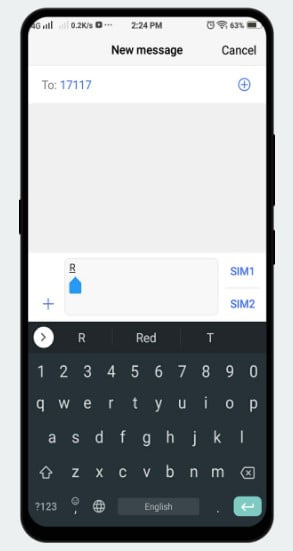
how-to-deactivate-ncell-prbt-service
  • Via Interactivate Voice Response: Dial 17117 and Follow Instructions
  • Via SMS: Type R and send SMS to 17117

You can simply dial 17117 and follow instructions or Type ‘R’ in SMS and send it to 17117. It’s that easy. In this way, you can simply deactivate the Ncell PRBT Service.

Price of Ncell PRBT Service

We talked about Activating and Deactivating the PRBT Service but now let’s talk about the price. The charges for Ncell PRBT are listed below.

Product TypePrice
PRBT Service3 days3
Monthly19
90 days19
PRBT Tone3 days3
Monthly19
90 days19

PRBT for 3 days Costs Rs. 3, while Monthly and 90 days costs the same Rs. 19. Likewise, PRBT Tone costs the same Rs 3, Rs 19 for 3 days, Monthly and 90 days. These are the charges of PRBT Service and PRBT Tone.

If you have any problem then you can visit the official site of Ncell for PRBT. Likewise, Ncell has other exciting offers for data with Ncell Data Packs.

Also, if you are SIM is Damaged then you check our “How To Replace Damaged/ Lost SIM Card For NTC, Ncell, And Smart“.

If you any questions about the Ncell ringback tone, then please comment down below, we are looking forward towards solving your problem.

Follow us on Facebook, Google News, and Viber to get the latest news, and information about Nepal Telecom, Ncell, Smart Cell, ISPs, mobile apps, and phones in Nepal.

Latest Posts

  • Ncell users get up to 60% discounts on Ultima gadgets
  • Top 5 Features of Uber in Nepal (2026)
  • Uber Nepal: Officially Launched in Kathmandu — Ride Options, Fares & How to Register (2026)
  • Daraz brings 6.6 mid-year shopping campaign with up to 75% off
  • Mero Kitta App Nepal: How to Use, Download & Features [2026]
  • How my life changed after buying a monthly data pack?
  • Vianet brings Stadium Experience Home with 250 Mbps plan, Dami App discount
Comments
Previous Post

5G in Nepal | Features, Spectrum, Availability, Compatible Devices [2026]

Next Post

Googlefier Allows To Easily Install Google Apps (GMS) On Huawei/Honor Phones

Dinesh

Dinesh

Senior Editor; An experienced tech writer covering news mostly on telecommunication, internet, latest tech & trends, and Gadgets. Being a technophile, I am particularly fascinated by the evolution of mobile networks in Nepal from legacy networks (2G, 3G) to 4G (with VoLTE, VoWiFi, eSIM) and the prospects of the upcoming 5G, and equally enthralled by the development of internet from the dial-up connection to the 2 Gbps XGS-PON fiber broadband technology and their transformative impact in the country.

Related Posts

How mobile network works
How To

How does Mobile network work? Complete Guide to Signal, Towers

May 30, 2026
How to find who is connected or using your Wifi internet?
How To

How to See Who’s Using Your WiFi: 5 Methods (Nepal 2026)

May 26, 2026
How to prioritize Wifi network for best performance
How To

How to prioritize WiFi network for best internet performance?

May 23, 2026
Load More

You may also read

Ntc FTTH

Nepal Telecom Fiber Internet: Price, Speed, Offer, Packs [2026]

June 2, 2026
How to watch world cup Football matches in Nepal

How to Watch Football World Cup 2026 Live in Nepal? Find All Fixtures

June 6, 2026
FIFA World cup 2026 full fixtures in Nepali time

FIFA World Cup 2026: Schedule in Nepali Time, Groups & Venues

June 2, 2026
Nepal Telecom Ntc customer care numbers

Ntc Customer Care Number for Complain & Info Query [2026]

February 5, 2026
Latest Vianet logo

Vianet Internet Packages in Nepal: Prices, FUP, and ViaTV

March 27, 2026
Nepal Telecom Ntc eSIM

How to Activate Ntc eSIM? Upgrade or New [2026 Update]

June 6, 2026
NepaliTelecom

Nepalitelecom.com is a website/blog which provides information regarding telecommunication in Nepal along with Gadgets and has been doing some research for the telecom market in Nepal. We intend to do more of such survey/research in the Nepalese Telecom sector.

SiteMap

📢 Follow us on Viber to get the latest news, and information about Nepal Telecom, Ncell, ISPs, mobile apps, and phones in Nepal.

Popular Categories

Ntc | Ncell | Telco News | ISP | NTA | Gadgets

Recent Posts

  • Ncell users get up to 60% discounts on Ultima gadgets
  • Top 5 Features of Uber in Nepal (2026)
  • Uber Nepal: Officially Launched in Kathmandu — Ride Options, Fares & How to Register (2026)

© 2026 Nepalitelecom

No Result
View All Result
  • Home
  • Telco News
  • Gadgets Nepal
  • Nepal Telecom
  • Ncell
  • Digital Nepal
  • How To
  • Editors’ Pick

© 2026 Nepalitelecom