• Ntc
  • Ncell
  • Samsung
  • Apple
  • Xiaomi
  • 2G to 5G
  • ISP
  • NTA
  • Tariffs
  • About us
Monday, April 20, 2026
NepaliTelecom
  • Home
  • Telecom News
    • News
    • NTA
    • Ntc
    • Ncell
    • Smart Cell
    • Digital Nepal
  • Gadgets
  • How To
  • Editors’ Pick
  • Contact
  • About
No Result
View All Result
  • Home
  • Telecom News
    • News
    • NTA
    • Ntc
    • Ncell
    • Smart Cell
    • Digital Nepal
  • Gadgets
  • How To
  • Editors’ Pick
  • Contact
  • About
No Result
View All Result
NepaliTelecom
No Result
View All Result

Home » How to Check Balance in Ncell SIM? | [2025] USSD, SMS, IVR

How to Check Balance in Ncell SIM? | [2025] USSD, SMS, IVR

NepaliTelecom by NepaliTelecom
October 19, 2025
in How To, Ncell
Reading Time: 3 mins read
How to check balance in Ncell

In this post, you will find ways to check balance in Ncell SIM in 2025. There are USSD codes, SMS sending number, Calling number and all information for it.

People need to check the balance of their phone time and again. There is a multitude of reasons for the balance check. First, it is for being aware of the balance cut for different services. Secondly, to know if their balance is sufficient for any services used while going somewhere (traveling). For illiterate people, you may need to prepare recharge cards at some places, as it’s hard to find it everywhere.

But for others, you can easily top up anywhere using your bank account or other digital wallet apps like eSewa, Khalti.

Some people being extra careful, may need to check the balance after every service they use. They can follow easy processes below to find the money that is in their SIM account. Here we are referring to the main balance which can be used for almost all services.

  • Latest Ncell data pack with detailed information.

How to check the balance in Ncell SIM?

To check the balance in Ncell SIM, you need to follow one of the following four process.

  • From USSD, you need to dial either *101# or *901# and press call to get the balance on your screen.
  • From SMS, you need to send a blank message or any text to 90011. You will get a reply with the balance in your account, along with the Ncell loan info if you have any.
  • From calling an IVR service, you need to call 9001 and dial 1 for the balance. You can also recharge the Ncell number from this by dialing 2.
  • You can also check the balance from Ncell mobile app, which has self-service functionality. Simply install the app, log in and you can check the balance by scrolling down on the first page after logging in.

If you find low balance in your Ncell mobile, you can use the online recharge method which Ncell started for easy recharge. Similarly, you can find other ways to recharge your Ntc Ncell mobile account online.

Here is a snapshot of the Ncell balance query response via USSD.
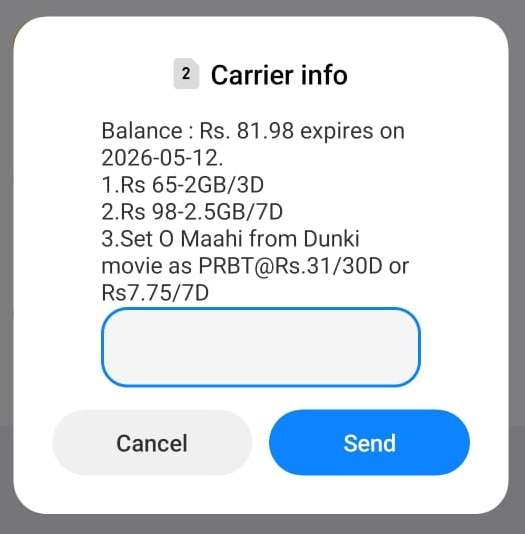
Check Ncell balance USSD method

Sometimes you might have long validity and you are in need of balance, then you can ask your friends to send the balance to you. There are also times when you need to help others by transferring a balance in Ncell SIM.

Ncell does not charge the customer to check the balance in Ncell. This kind of service is free for most of the telecom operators here in the nation and worldwide.

You can check the remaining data volume in Ncell or Status of Ncell data packs.

Follow us on Facebook, Twitter, and Viber to get the latest news, and information about Nepal Telecom, Ncell, Smart Cell, ISPs, mobile apps, and phones in Nepal.

Latest Posts

  • Uber to launch in Nepal: Date, Benefits, Market Competition
  • A Realistic Guide to Growing TikTok Followers
  • Govt. Unveils National Commitments; Own Satellite, Coding at School Level, IT hub, more
  • Nagarik App brings Nepal Engineering Council link: NOC, PSC Admit Card soon
  • vivo Y05 Price in Nepal, Specifications, and Availability
  • Regulator NTA warns against using its official logo
  • Zum Rides is launching ride-sharing service with electric cycles
Comments
Previous Post

NT regains top spot in voice.

Next Post

How to save your mobile from rain, specially in Mansoon

NepaliTelecom

NepaliTelecom

Related Posts

Ncell logo and tower
Ncell

Ncell PAYG Option: How to Activate, Deactivate & Avoid Balance Loss

April 9, 2026
Ncell unlimited data and voice pack price Rs 699
Ncell

Ncell’s unlimited data/voice pack price slashed by 65% to Rs 699

April 8, 2026
Ntc Ncell subscription model plan
Editors' Pick

Nepal Government Plans Subscription-Based Telecom Services: NTC & Ncell to Follow

April 7, 2026
Load More

You may also read

Ntc FTTH

Nepal Telecom Fiber Internet: Price, Speed, Offer, Packs [2026]

March 9, 2026
Nepal Telecom NTC New Year Offer 2083

Nepal Telecom Brings New Year Offer 2083 with up to 300 GB data

April 13, 2026
how to check Ntc Ncell number owner name and transfer ownership

How to check Ntc, Ncell number owner name & Transfer

April 15, 2026
Nepal Telecom Ntc SEE student SIM offer

Nepal Telecom SEE Offer 2082 | Price, Benefits, Activation

April 9, 2026
Nepal Telecom Ntc customer care numbers

Ntc Customer Care Number for Complain & Info Query [2026]

February 5, 2026
New WorldLink logo

WorldLink Internet Packages: Price, Offers, FUP, 2026 update

January 7, 2026
NepaliTelecom

Nepalitelecom.com is a website/blog which provides information regarding telecommunication in Nepal along with Gadgets and has been doing some research for the telecom market in Nepal. We intend to do more of such survey/research in the Nepalese Telecom sector.

SiteMap

📢 Follow us on Viber to get the latest news, and information about Nepal Telecom, Ncell, ISPs, mobile apps, and phones in Nepal.

Popular Categories

Ntc | Ncell | Telco News | ISP | NTA | Gadgets

Recent Posts

  • Uber to launch in Nepal: Date, Benefits, Market Competition
  • A Realistic Guide to Growing TikTok Followers
  • Govt. Unveils National Commitments; Own Satellite, Coding at School Level, IT hub, more

© 2025 Nepalitelecom

No Result
View All Result
  • Home
  • Telco News
  • Gadgets Nepal
  • Nepal Telecom
  • Ncell
  • Digital Nepal
  • How To
  • Editors’ Pick

© 2025 Nepalitelecom