• Ntc
  • Ncell
  • Samsung
  • Apple
  • Xiaomi
  • 2G to 5G
  • ISP
  • NTA
  • Tariffs
  • About us
Monday, July 6, 2026
NepaliTelecom
  • Home
  • Telecom News
    • News
    • NTA
    • Ntc
    • Ncell
    • Smart Cell
    • Digital Nepal
  • Gadgets
  • How To
  • SpeedTest
  • Contact
  • About
No Result
View All Result
  • Home
  • Telecom News
    • News
    • NTA
    • Ntc
    • Ncell
    • Smart Cell
    • Digital Nepal
  • Gadgets
  • How To
  • SpeedTest
  • Contact
  • About
No Result
View All Result
NepaliTelecom
No Result
View All Result

Home » How To » How to configure your handset for GPRS(2G)/3G/4G in NTC.

How to configure your handset for GPRS(2G)/3G/4G in NTC.

NepaliTelecom by NepaliTelecom
April 14, 2025
in How To
Reading Time: 4 mins read
GPRS ntc configuration
Follow us on

Last Updated on April 14, 2025

We have been writing posts about Nepal Telecom’s data packs and internet registration procedure. But people are also regularly asking about the process for data configuration in GPRS(2G)/3G/4G. NTC started GPRS service in 2009 and then added 3G and 4G service later.

NTC GPRS configuration process has changed from manual to SMS query. Still, people are confused about the process. So, we are here to provide information on how to configure GPRS to 4G data in Ntc GSM mobile.

Find the latest data packs in Ntc SIM.

Table of contents

  • How to subscribe data service?
  • Process for Ntc GPRS configuration
    • Ntc MMS settings

How to subscribe data service?

If a customer wants to use NT GPRS/3G or 4G service in their GSM mobile, they should first confirm the registration of their SIM for GPRS/ 3G. These days, the data service comes as a default. But if there is any issue, People can register easily by

  • sending a message VGPRS or 3G to 1415.

To subscribe 3G in Ntc, you need to

  • send a message 3G to 1415.

Similarly, for 4G, customer need to

  • dial *444# and select 1

Read more: How to activate and put 4G in your phone.

Process for Ntc GPRS configuration

After the registration, the subscriber needs to configure their handset for GPRS service (which is the same for 3G or even 4G in GSM mobile) as below.

  • You can simply add the access point by going to Settings-> Mobile networks or Cellular Networks -> Access point name.
  • put the name as “ntc” and APN as “ntnet”
  • you have to save it and
  • use it as default by selecting it.

Ntc MMS settings

  • For MMS settings in Ntc, you have to put the following.
    MMS APN: ntmms
    MMS home page/server address: 192.80.11.180

Earlier they used to provide another APN named “ntwap” with some ports and proxy information. Now after the upgrade of Ntc core system, they request all people to use “Ntnet” as the APN as stated above in the process.

These days, NT also sends a message to a customer from 1408, once he/she switches on after putting the new SIM card. In the message, NT has asked to put “ntnet” as an access point name. You will also be informed about this if you take out the SIM for any reason.

Here is the format of the message: “Dear Customer, To activate NTC internet service, please add a new configuration named ‘ntnet’ for GPRS, set access point name as ntnet, set home page as ‘http://www.ntc.net.np’, you can enjoy the GPRS service”.

Also Read this: Easy Ntc GPRS settings or configuration.

Well, you can name the access point as NTC or any other name, but the app should be ‘ntnet’ without the inverted. See the picture below for what to do after you go to settings-> mobile networks -> Access point names. Add new.
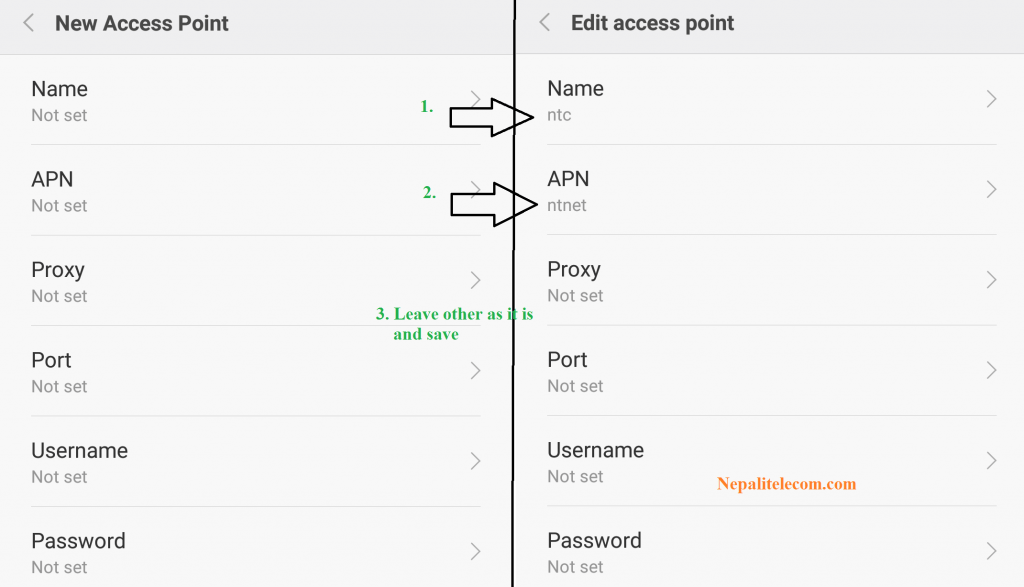
GPRS Settings Nepal Telecom Ntc

We suggest you to follow the steps in the article for best way to use mobile data.

Tell us what do you think of the NTC mobile internet GPRS configuration? If you have any queries, do feedback us in the comment below or through our Facebook page.

Follow us on Facebook, Google News, and Viber to get the latest news, and information about Nepal Telecom, Ncell, Smart Cell, ISPs, mobile apps, and phones in Nepal.

Latest Posts

  • Daraz 7.7 2026 Announced: Up to 75% off, Mega Giveaways
  • Government’s 100 days work progress: 4G in 750 local levels, recurring plan, more
  • Government to implement investigation committee’s report on Ncell share purchase
  • YetiCloud.AI launched to enable access to NVIDIA GPUs in Nepal
  • 9 candidates shortlisted for NTA chairman post: Find their names
  • Nepal Telecom expands 4G coverage in Tikauli jungle, Bharatpur
  • Nepal Telecom to home deliver SIM card by postal service from Shravan 1, 2083
Comments
Previous Post

Ncell to send SMS alert for flood and landslides

Next Post

Huawei P9 launched in Nepal

NepaliTelecom

NepaliTelecom

Related Posts

Keep you Nepali SIM for life avoid telco reselling to a new user
How To

How to Keep Your Nepali SIM Number for Life (NTC & Ncell)

June 29, 2026
Check NEB Plus 2 11, 12 result in Nepal
How To

NEB Grade 12 Result 2082 Nepal: How to Check Online, SMS, USSD & Download Marksheet

June 19, 2026
How to watch world cup Football matches in Nepal
How To

How to Watch Football World Cup 2026 Live in Nepal? Find All Fixtures

June 11, 2026
Load More

You may also read

Ntc FTTH

Nepal Telecom Fiber Internet: Price, Speed, Offer, Packs [2026]

July 2, 2026
Keep you Nepali SIM for life avoid telco reselling to a new user

How to Keep Your Nepali SIM Number for Life (NTC & Ncell)

June 29, 2026
Nepal Telecom NTC SIM home delivery

Nepal Telecom to home deliver SIM card by postal service from Shravan 1, 2083

July 2, 2026
How to watch world cup Football matches in Nepal

How to Watch Football World Cup 2026 Live in Nepal? Find All Fixtures

June 11, 2026
Latest Vianet logo

Vianet Internet Packages in Nepal: Prices, FUP, and ViaTV

June 8, 2026
how to check Ntc Ncell SIM owner name change Nepal 2026

How to Check & Change Ntc, Ncell SIM Owner Name [2026 Update]

June 24, 2026
NepaliTelecom

Nepalitelecom.com is a website/blog which provides information regarding telecommunication in Nepal along with Gadgets and has been doing some research for the telecom market in Nepal. We intend to do more of such survey/research in the Nepalese Telecom sector.

SiteMap

📢 Follow us on Viber to get the latest news, and information about Nepal Telecom, Ncell, ISPs, mobile apps, and phones in Nepal.

Popular Categories

Ntc | Ncell | Telco News | ISP | NTA | Gadgets

Recent Posts

  • Daraz 7.7 2026 Announced: Up to 75% off, Mega Giveaways
  • Government’s 100 days work progress: 4G in 750 local levels, recurring plan, more
  • Government to implement investigation committee’s report on Ncell share purchase

© 2026 Nepalitelecom

No Result
View All Result
  • Home
  • Telco News
  • Gadgets Nepal
  • Nepal Telecom
  • Ncell
  • Digital Nepal
  • How To
  • Editors’ Pick

© 2026 Nepalitelecom