• Ntc
  • Ncell
  • Samsung
  • Apple
  • Xiaomi
  • 2G to 5G
  • ISP
  • NTA
  • Tariffs
  • About us
Friday, June 5, 2026
NepaliTelecom
  • Home
  • Telecom News
    • News
    • NTA
    • Ntc
    • Ncell
    • Smart Cell
    • Digital Nepal
  • Gadgets
  • How To
  • SpeedTest
  • Contact
  • About
No Result
View All Result
  • Home
  • Telecom News
    • News
    • NTA
    • Ntc
    • Ncell
    • Smart Cell
    • Digital Nepal
  • Gadgets
  • How To
  • SpeedTest
  • Contact
  • About
No Result
View All Result
NepaliTelecom
No Result
View All Result

Home » Telco News » How to communicate efficiently in flood situation?

How to communicate efficiently in flood situation?

NepaliTelecom by NepaliTelecom
September 28, 2024
in How To, Telco News
Reading Time: 3 mins read
Follow us on

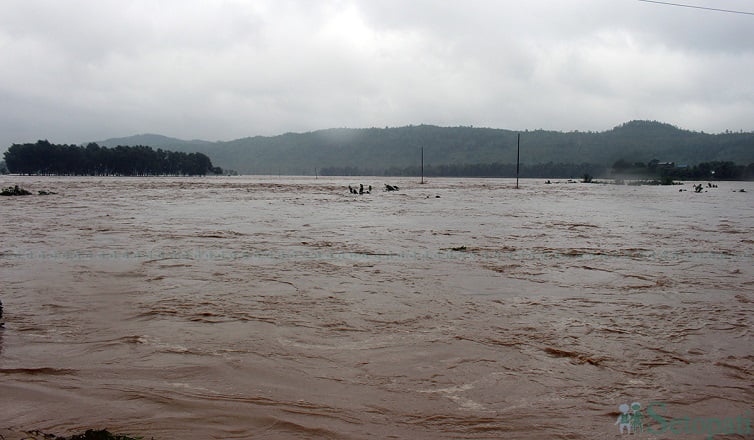
Nepal is one of the most prone country for flood and landslides. Recent heavy rain has made a huge impact in the terai area, including loss of life, physical structures. The unabated rain made the flood sweep away several homes and the water even entered inside people homes. People are bound to live in temporary places in different areas with no electricity and food. Government officials are doing their best to rescue and support the affected people.

Communication is one of the tools that helps the rescue and support effort to reach all of the affected. In these situation, mobile phone is the only mean to rely on for communication. As mobile network also gets affected with flood, landslide, the communication is also not good with less or no coverage or congestion (no sufficient channels). Mobile phones also help to look for stuffs and way in crisis of no electricity.

In this post we are trying to present the best efficient way to use your phone for communication and more.

  • Use messaging, unless its urgent for voice call or make it short to leave voice channels for others due to congestion.
  • Save battery power, by putting it in airplane mode, when you are not using it or coverage is not there.
  • Decrease the phone screen brightness, as it takes a lot of battery power.
  • Delete or disable the unwanted apps that take more power or data.
  • Check if sufficient balance is there in your phone. Recharge pre-hand or ask your friends to send some balance before. Ncell Sapati comes handy in those situations. Mobile with balance less than Rs 5 can get Sapati of Rs 40 or data/voice pack by dialing *9988#. Read more for Ncell Sapati Loan.
  • Look for charging connection or backup power (even battery bank).
  • If WiFi or other data network is available, use it to send your situation to other people. Social medias are much better to relay the information. Ask some popular pages to relay the information in case you need more attention.
  • Be updated with the flood alert and other SMS to your phone from the responsible departments like department of meteorology and hydrology.
  • Government officials like Nepal Police, Nepal Army, even Hello Sarkar can help you if you are dire need of rescue or support. Contacting them in social medias also work. Make sure you provide enough information.
  • Save your phone from drowning, wrap your phone inside a new plastic (multiple layer) in case to save from rain or flood water.
  • If your phone is out of battery, use another backup medium for regular information. FM radio helps a lot in this general news from the officials.
  • As water has already entered inside your home, check if the electricity is short circuit or leaked to the water. Switch off the mains if you suspect the leak or short circuit. You won’t know later when the electricity comes later and the leak could shock or damage your phone while charging.
  • Phone can also be use as a torch, but use it only when it is urgent as it drains battery fast. Or use a separate torch.

These are some of the electronic means to help people for communication or other using phone. Please spread the message to the people in the flood areas.

Follow us on Facebook, Google News, and Viber to get the latest news, and information about Nepal Telecom, Ncell, Smart Cell, ISPs, mobile apps, and phones in Nepal.

Latest Posts

  • How my life changed after buying a monthly data pack?
  • Vianet brings Stadium Experience Home with 250 Mbps plan, Dami App discount
  • NRB urges users to inform bank upon SIM number change
  • Govt. imposes green tax on smartphones, price to shoot further up!
  • Starlink in Nepal 2026: SpaceX Meets Minister, License Talks
  • Redmi Pad 2 9.7 lands in Nepal: Best budget tablet of the year!
  • How does Mobile network work? Complete Guide to Signal, Towers
Comments
Previous Post

Heavy rain, flood disrupts mobile network in Terai region.

Next Post

Ntc, Ncell offers relief for communication in flood disaster

NepaliTelecom

NepaliTelecom

Related Posts

How mobile network works
How To

How does Mobile network work? Complete Guide to Signal, Towers

May 30, 2026
How to find who is connected or using your Wifi internet?
How To

How to See Who’s Using Your WiFi: 5 Methods (Nepal 2026)

May 26, 2026
How to prioritize Wifi network for best performance
How To

How to prioritize WiFi network for best internet performance?

May 23, 2026
Load More

You may also read

Ntc FTTH

Nepal Telecom Fiber Internet: Price, Speed, Offer, Packs [2026]

June 2, 2026
How to watch world cup Football matches in Nepal

How to Watch Football World Cup 2026 Live in Nepal? Find All Fixtures

June 2, 2026
FIFA World cup 2026 full fixtures in Nepali time

FIFA World Cup 2026: Schedule in Nepali Time, Groups & Venues

June 2, 2026
Budget speech FY 2083 84 IT Telecom

Highlights from Budget speech FY 2083/84 on telecom and digital priorities

May 30, 2026
Nepal Telecom Ntc customer care numbers

Ntc Customer Care Number for Complain & Info Query [2026]

February 5, 2026
Nepal Telecom Ntc eSIM

How to Activate Ntc eSIM? Upgrade or New [2026 Update]

May 19, 2026
NepaliTelecom

Nepalitelecom.com is a website/blog which provides information regarding telecommunication in Nepal along with Gadgets and has been doing some research for the telecom market in Nepal. We intend to do more of such survey/research in the Nepalese Telecom sector.

SiteMap

📢 Follow us on Viber to get the latest news, and information about Nepal Telecom, Ncell, ISPs, mobile apps, and phones in Nepal.

Popular Categories

Ntc | Ncell | Telco News | ISP | NTA | Gadgets

Recent Posts

  • How my life changed after buying a monthly data pack?
  • Vianet brings Stadium Experience Home with 250 Mbps plan, Dami App discount
  • NRB urges users to inform bank upon SIM number change

© 2026 Nepalitelecom

No Result
View All Result
  • Home
  • Telco News
  • Gadgets Nepal
  • Nepal Telecom
  • Ncell
  • Digital Nepal
  • How To
  • Editors’ Pick

© 2026 Nepalitelecom