• Ntc
  • Ncell
  • Samsung
  • Apple
  • Xiaomi
  • 2G to 5G
  • ISP
  • NTA
  • Tariffs
  • About us
Thursday, May 28, 2026
NepaliTelecom
  • Home
  • Telecom News
    • News
    • NTA
    • Ntc
    • Ncell
    • Smart Cell
    • Digital Nepal
  • Gadgets
  • How To
  • Editors’ Pick
  • Contact
  • About
No Result
View All Result
  • Home
  • Telecom News
    • News
    • NTA
    • Ntc
    • Ncell
    • Smart Cell
    • Digital Nepal
  • Gadgets
  • How To
  • Editors’ Pick
  • Contact
  • About
No Result
View All Result
NepaliTelecom
No Result
View All Result

Home » Nepal Telecom » Now You Can Buy NTC Packs on Khalti Wallet

Now You Can Buy NTC Packs on Khalti Wallet

Dinesh by Dinesh
April 23, 2021
in Apps, Nepal Telecom
Reading Time: 3 mins read
Ntc packs available on Khalti
Follow us on

One of the prominent digital wallets in Nepal Khalti has introduced a new feature that allows you to buy NTC packs. Now the users of Khalti can breathe a sigh of relief when they run out of packages on their NTC number.

  • Check out all the latest data packs on Ntc

More About The Features

A striking aspect of this feature is that users can buy data packs directly from Khalti’s own balance. This means you do not have to worry about a lack of balance on your NTC sim.

Additionally, you can buy all types of data packs on Khalti from the NTC network just as you would do by the USSD method on a phone.

Besides data packs, users can also buy SMS and Voice packs just like they would get on regular methods on the phone. Furthermore, Khalti will allow users to send packs as a gift to their friends and family.

Steps to Buy NTC Data Packs on Khalti

The steps to buying NTC’s data packs are fairly easy and require just a few clicks. The simplistic interface of Khalti makes it convenient too.

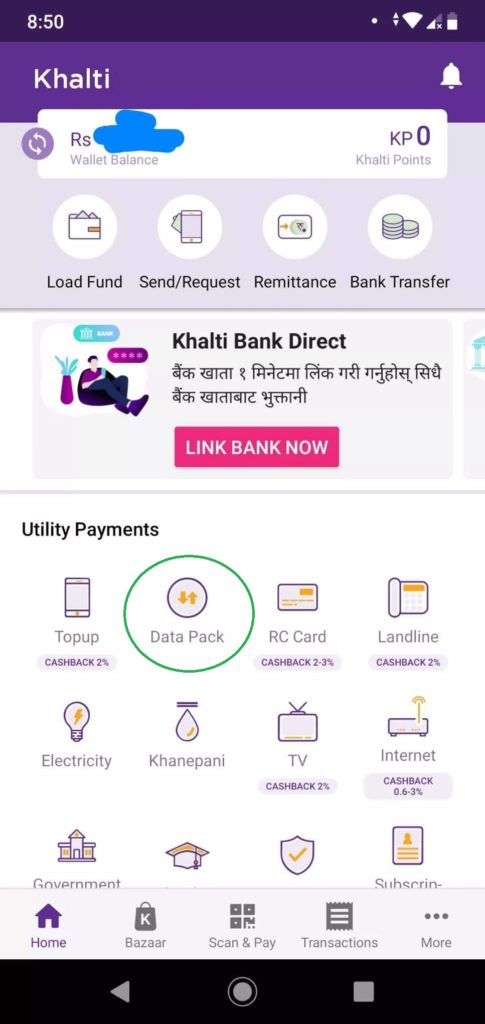
  • First, launch Khalti app on your smartphone.
  • Then on the Home Screen, you will see many options.
  • Click on Data Pack.
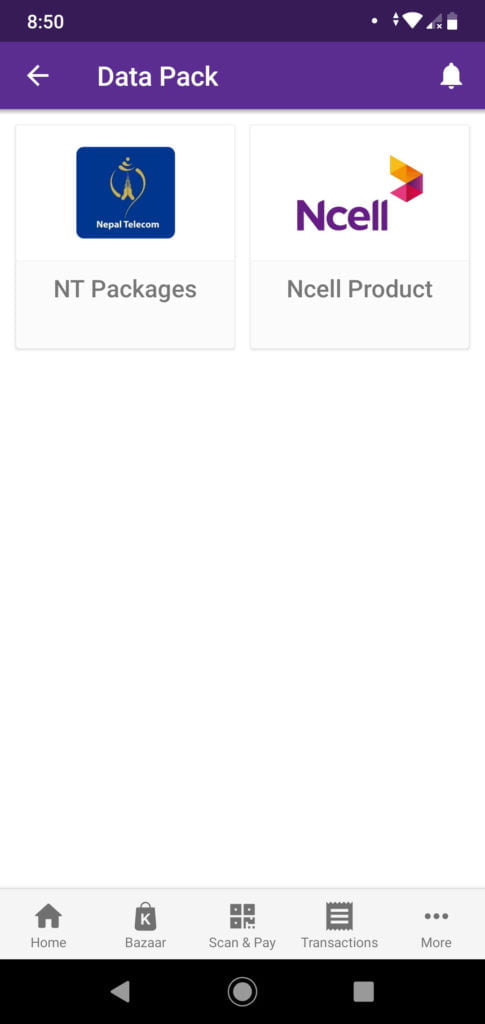
  • This will take you to the screen where you will have to choose your carrier network.
  • Click on NT (Nepal Telecom).
  • Now you will see various data, SMS, and Voice packs.
  • Choose the pack as you want.
Nepal Telecom packages Khalti

Also check out: The Reasons You Should Use the Khalti App

Significance of this feature

With this feature, Khalti users will have one convenient option to buy data, SMS, or voice packs on the go. If you use Khalti, then you do not have to worry about mobile balance on the way out. They can utilize the Khalti app to buy the packs or SMS and Voice packs instantly.

This feature serves as peace of mind as people are always on the move and they can utilize the Khalti alternative without the main balance on their SIM card.

As Khalti has brought this feature, other digital wallets or payment services in Nepal are also likely to introduce the same very soon on their platforms too.

What do you think of Khalti incorporating NTC’s data pack features on its platform? Are you planning to make the most of this? Let us know in the comments section below.


Follow us on Facebook, Google News, and Viber to get the latest news, and information about Nepal Telecom, Ncell, Smart Cell, ISPs, mobile apps, and phones in Nepal.

Latest Posts

  • Pathao Nepal launches helicopter booking, trip to Muktinath, EBC
  • Huawei Nepal Hosts Mini MWC 2026 with Nepal’s Operators
  • Ncell bags ISO 9001 and ISO 14001 certifications
  • NTC Republic Day Offer 2083: 5GB/Day at Rs 499 | Nepal
  • Nepal Telecom launches 4G in Makalu Base Camp Route
  • New POCO Service Center Opens at Ramesh Complex, Sanepa
  • Govt. launches MoFA Mitra app for consular services
Comments
Previous Post

Samsung Offers Software to Turn Galaxy Devices Into IoT

Next Post

Best Secure and Private Messaging Apps in 2021

Dinesh

Dinesh

Senior Editor; An experienced tech writer covering news mostly on telecommunication, internet, latest tech & trends, and Gadgets. Being a technophile, I am particularly fascinated by the evolution of mobile networks in Nepal from legacy networks (2G, 3G) to 4G (with VoLTE, VoWiFi, eSIM) and the prospects of the upcoming 5G, and equally enthralled by the development of internet from the dial-up connection to the 2 Gbps XGS-PON fiber broadband technology and their transformative impact in the country.

Related Posts

Pathao helicopter booking in Nepal
Apps

Pathao Nepal launches helicopter booking, trip to Muktinath, EBC

May 28, 2026
Ntc republic day offer 2083
Nepal Telecom

NTC Republic Day Offer 2083: 5GB/Day at Rs 499 | Nepal

May 27, 2026
Ntc 4G Coverage
Nepal Telecom

Nepal Telecom launches 4G in Makalu Base Camp Route

May 27, 2026
Load More

You may also read

Ntc FTTH

Nepal Telecom Fiber Internet: Price, Speed, Offer, Packs [2026]

May 9, 2026
How to check SEE Result 2082 online Nepal

How to Check SEE Result 2082 Online: NTC, SMS, Websites & Marksheet Guide

May 11, 2026
Nepal Telecom Ntc customer care numbers

Ntc Customer Care Number for Complain & Info Query [2026]

February 5, 2026
Nepal Telecom Ntc eSIM

How to Activate Ntc eSIM? Upgrade or New [2026 Update]

May 19, 2026
how to check Ntc Ncell SIM owner name change Nepal 2026

How to Check & Change Ntc, Ncell SIM Owner Name [2026 Updated Guide]

May 25, 2026
Latest Vianet logo

Vianet Internet Packages in Nepal: Prices, FUP, and ViaTV

March 27, 2026
NepaliTelecom

Nepalitelecom.com is a website/blog which provides information regarding telecommunication in Nepal along with Gadgets and has been doing some research for the telecom market in Nepal. We intend to do more of such survey/research in the Nepalese Telecom sector.

SiteMap

📢 Follow us on Viber to get the latest news, and information about Nepal Telecom, Ncell, ISPs, mobile apps, and phones in Nepal.

Popular Categories

Ntc | Ncell | Telco News | ISP | NTA | Gadgets

Recent Posts

  • Pathao Nepal launches helicopter booking, trip to Muktinath, EBC
  • Huawei Nepal Hosts Mini MWC 2026 with Nepal’s Operators
  • Ncell bags ISO 9001 and ISO 14001 certifications

© 2026 Nepalitelecom

No Result
View All Result
  • Home
  • Telco News
  • Gadgets Nepal
  • Nepal Telecom
  • Ncell
  • Digital Nepal
  • How To
  • Editors’ Pick

© 2026 Nepalitelecom