• Ntc
  • Ncell
  • Samsung
  • Apple
  • Xiaomi
  • 2G to 5G
  • ISP
  • NTA
  • Tariffs
  • About us
Thursday, June 11, 2026
NepaliTelecom
  • Home
  • Telecom News
    • News
    • NTA
    • Ntc
    • Ncell
    • Smart Cell
    • Digital Nepal
  • Gadgets
  • How To
  • SpeedTest
  • Contact
  • About
No Result
View All Result
  • Home
  • Telecom News
    • News
    • NTA
    • Ntc
    • Ncell
    • Smart Cell
    • Digital Nepal
  • Gadgets
  • How To
  • SpeedTest
  • Contact
  • About
No Result
View All Result
NepaliTelecom
No Result
View All Result

Home » Apps » Khalti allows Loading funds into TMS broker accounts

Khalti allows Loading funds into TMS broker accounts

Dinesh by Dinesh
December 17, 2023
in Apps, Digital Nepal
Reading Time: 3 mins read
collateral fund load and broker payment on Khalti
Follow us on

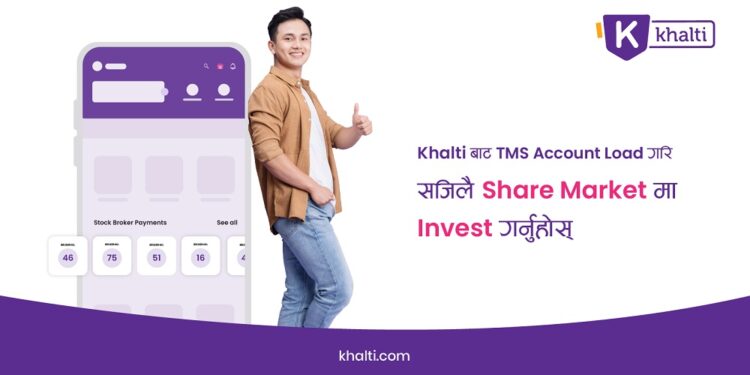
Khalti now allows users to load collateral funds to TMS broker accounts. This groundbreaking facility is launched to enable investors and small and medium-scale investors to delve into the stock market with ease. Khalti and Nepal Stock Exchange (NEPSE) collaborated to bring this seamless collateral load service along with the Broker Payment service.

Khalti has been pivotal in enhancing NEPSE activities. The digital wallet provider offers financial services such as Mero Share, DEMAT, and SIP (Systematic Investment Plan) payment. In a sign of its dedication to the same, the payment service provider (PSP) brought collateral load service to facilitate loading funds to TMS broker accounts. With this service, Khalti users let small and medium-scale investors explore and invest in the stock market in Nepal.

Don’t miss: How To Renew Your Demat And Mero Share Account? 
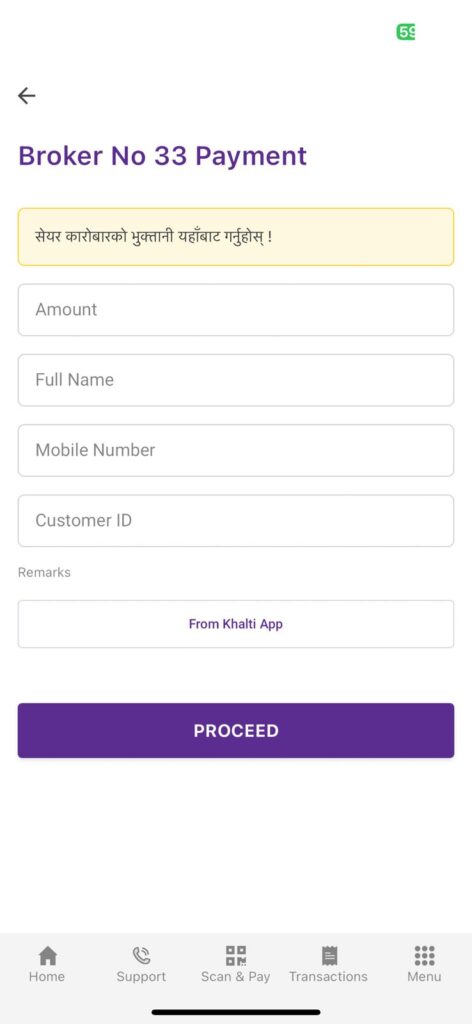
TMS Broker payment on Khalti

How to use collateral load funds service on Khalti?

Here is the easy step-by-step process to use collateral load through Khalti:

  1. Visit the Broker’s TMS portal
  2. Tap on “Fund Management”
  3. Select “Load Collateral”
  4. Enter “Khalti” under the Bank option and Web under the Payment Method option
  5. Enter your Amount, Remarks and then submit
  6. Enter Khalti credentials and submit again to complete the transaction.

Also read: Top Mobile Wallets, Digital Payment Providers in Nepal

How to make broker account payments on Khalti?

At the same time, Khalti has also launched a facility to make broker payments. Here, we list the steps to help you make broker payments on Khalti:

  1. Open  Broker’s TMS Portal
  2. Tap on “Fund Management”
  3. Tap on “Fund Settlement”
  4.  Tap on “Buy Information”
  5.  Tap on “payment due”
  6. Pay via Khalti to complete the transaction.

Upon the launch of the Collateral Load and Broker Payment Services, Khalti Chief Executive Officer (CEO) said, “With the aim of enhancing active participation in the capital market, we are providing our users Mero Share, Demat, and systematic investment plan (SIP) services, alongside payment solutions. Under this, thousands of small and middle-scale investors are being benefited from our services through Khalti. Furthermore, we aim to continually expand our services in collaboration with more institutions in the future, consistently progressing towards our goal.”

Khalti is an ISO 27001:2023-certified company with a leading stature in Nepal’s digital payment landscape. The company being just six years old has been at the forefront of promoting the digital economy and boasts a 3.1 million user base throughout the country. Through the Khalti app, users can make their internet, TV, electricity etc. payments. Khalti’s interoperability with FonePay has brought transformative changes to mobile payment in Nepal. Besides utility payments, the app lets users book movie, flight, and various event tickets, and also pay government revenues among other payment services.

For any queries on collateral fund load and broker payment on Khalti, drop your query in the comment below.

Follow us on Facebook, Google News, and Viber to get the latest news, and information about Nepal Telecom, Ncell, Smart Cell, ISPs, mobile apps, and phones in Nepal.

Latest Posts

  • Government blocks 3 dozen websites free streaming FIFA WC 2026
  • DGo App brings Mobile Pass to stream Football World Cup 2026 at Rs 549
  • BTC Price vs Ethereum Performance: Comparing Strength Across the 2026 Market
  • Yango marks 1st anniversary, monthly 30% growth
  • Ncell Data Centre receives Tier 3 certification, a major milestone for digital goals
  • Vivo brings Summer Surprise Campaign with mega lucky draw
  • Nepalis can now send money to India via mobile banking apps | Cross-Border P2P Transaction
Comments
Previous Post

Ncell and Dhulikhel Hospital revolutionizing telemedicine in Nepal

Next Post

Find the Radio Frequency Policy for Telecom Services 2080

Dinesh

Dinesh

Senior Editor; An experienced tech writer covering news mostly on telecommunication, internet, latest tech & trends, and Gadgets. Being a technophile, I am particularly fascinated by the evolution of mobile networks in Nepal from legacy networks (2G, 3G) to 4G (with VoLTE, VoWiFi, eSIM) and the prospects of the upcoming 5G, and equally enthralled by the development of internet from the dial-up connection to the 2 Gbps XGS-PON fiber broadband technology and their transformative impact in the country.

Related Posts

Nepal blocks Pirate World cup football 2026 Streaming Sites apps
Digital Nepal

Government blocks 3 dozen websites free streaming FIFA WC 2026

June 11, 2026
DGo mobile pass for FIFA World cup 2026 Streaming Nepal
Digital Nepal

DGo App brings Mobile Pass to stream Football World Cup 2026 at Rs 549

June 10, 2026
Yango first anniversary in Nepal
Apps

Yango marks 1st anniversary, monthly 30% growth

June 10, 2026
Load More

You may also read

Ntc FTTH

Nepal Telecom Fiber Internet: Price, Speed, Offer, Packs [2026]

June 2, 2026
FIFA World cup 2026 full fixtures in Nepali time

FIFA World Cup 2026: Schedule in Nepali Time, Groups & Venues

June 2, 2026
How to watch world cup Football matches in Nepal

How to Watch Football World Cup 2026 Live in Nepal? Find All Fixtures

June 11, 2026
Nepal Telecom NTC FIFA Football World Cup 2026 package for NT TV users

Nepal Telecom launches FIFA World Cup 2026 package for NT TV users

June 11, 2026
Nepal Telecom Ntc customer care numbers

Ntc Customer Care Number for Complain & Info Query [2026]

February 5, 2026
Latest Vianet logo

Vianet Internet Packages in Nepal: Prices, FUP, and ViaTV

June 8, 2026
NepaliTelecom

Nepalitelecom.com is a website/blog which provides information regarding telecommunication in Nepal along with Gadgets and has been doing some research for the telecom market in Nepal. We intend to do more of such survey/research in the Nepalese Telecom sector.

SiteMap

📢 Follow us on Viber to get the latest news, and information about Nepal Telecom, Ncell, ISPs, mobile apps, and phones in Nepal.

Popular Categories

Ntc | Ncell | Telco News | ISP | NTA | Gadgets

Recent Posts

  • Government blocks 3 dozen websites free streaming FIFA WC 2026
  • DGo App brings Mobile Pass to stream Football World Cup 2026 at Rs 549
  • BTC Price vs Ethereum Performance: Comparing Strength Across the 2026 Market

© 2026 Nepalitelecom

No Result
View All Result
  • Home
  • Telco News
  • Gadgets Nepal
  • Nepal Telecom
  • Ncell
  • Digital Nepal
  • How To
  • Editors’ Pick

© 2026 Nepalitelecom