• Ntc
  • Ncell
  • Samsung
  • Apple
  • Xiaomi
  • 2G to 5G
  • ISP
  • NTA
  • Tariffs
  • About us
Sunday, April 19, 2026
NepaliTelecom
  • Home
  • Telecom News
    • News
    • NTA
    • Ntc
    • Ncell
    • Smart Cell
    • Digital Nepal
  • Gadgets
  • How To
  • Editors’ Pick
  • Contact
  • About
No Result
View All Result
  • Home
  • Telecom News
    • News
    • NTA
    • Ntc
    • Ncell
    • Smart Cell
    • Digital Nepal
  • Gadgets
  • How To
  • Editors’ Pick
  • Contact
  • About
No Result
View All Result
NepaliTelecom
No Result
View All Result

Home » How to check voter ID list details online? Election Commission

How to check voter ID list details online? Election Commission

Dinesh by Dinesh
April 5, 2026
in How To, Nepal
Reading Time: 4 mins read
Check voter list online Election commission Nepal

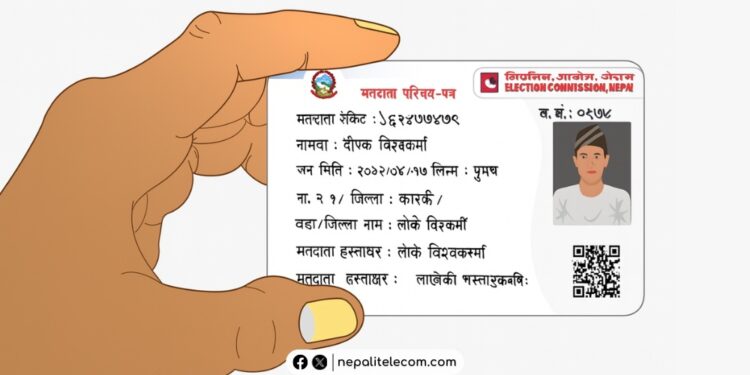
The Election Commission Nepal has opened pre-enrollment (registration) for voter ID registration starting Chaitra 23, 2082. This allows you to not just pre-enroll, but also check or edit your voter ID details online. This post guides you on how you can check your voter ID in the list (Matadata Namawali) online, which helps you find where you will cast your vote and even correct mistakes if there are any. Keep reading.

You can register for a voter ID online at your convenience. It’s super easy and only takes a few minutes. Learn how to find the candidate list for this election from all 165 constituencies.

Table of contents

  • What can you edit?
  • Steps to check your voter ID (list) roll details online
  • How to edit your voter ID details online?

What can you edit?

ECN has made a provision allowing you to apply for correction of errors in the voter list, removal of duplicate names, updating details of death and migration, etc.

You can apply to correct your voter ID name, surname, and address. Also, if there are two or more polling stations within the same ward, then you can move your name to the place convenient to you. You can correct your details as per your citizenship.

Steps to check your voter ID (list) roll details online

If you have already registered yourself as a voter, then here are the steps to check your voter ID list, aka voter roll details, online:

  • Visit the Election Commission portal https://election.gov.np/
  • Click on Voter Roll or go directly to the Voter list page of the Election Commission Nepal.
  • Click on province, district, local level, ward no., and voting (polling) station, and click on SUBMIT
  • The next screen shows you the list of registered voters, where you can also see your name. If it’s difficult to find, you can sort by selecting the first letter of your name in the Nepali alphabet.
  • After clicking your name, you need to provide your birthday or Citizenship number (as promoted for your identification) to get your voter list details (Matadata Namawali)

NOTE: You can also enter your personal details (date of birth or citizenship number) and check the “I am not a robot” box to get your voter ID details.
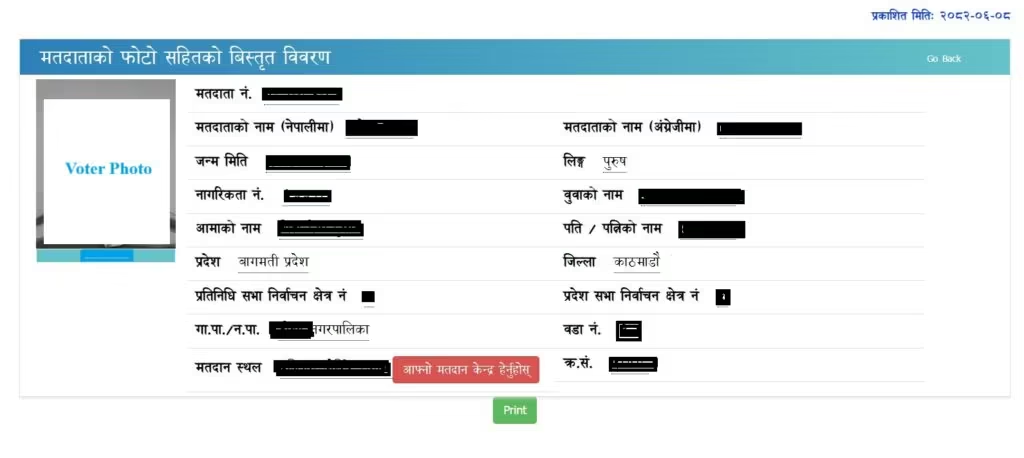
The website is updated with the database until 2082-Mangsir-21. Therefore, it is likely that even newly registered voters will now be able to view their details.

By clicking on the “Afno Matadan Kendra Hernuhos” (Check your polling station). The next page opens Google Maps, which shows your poll stations.
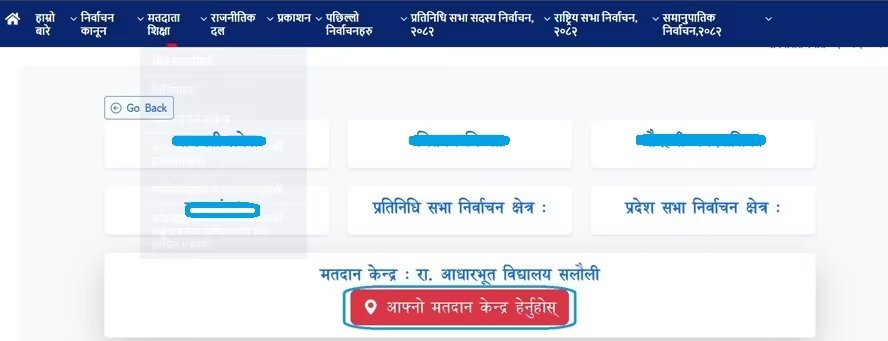
Check polling station Nepal election

Also: How to apply for National ID Card (NID) Nepal in 2025 | FAQs

How to edit your voter ID details online?

Follow these steps to correct your voter details online:

  • Go to https://election.gov.np/
  • Click on One Pre-Enrollment and click on update voter list, or go directly to Voter Pre-Enrollment and Edit page of Election Commission Nepal
  • You now need to enter your mobile number
  • Enter the OTP code you received
  • Click on “New Request“
  • Now, follow the prompts to edit your registered voter details online
  • If you have already done preregistration earlier using your mobile phone, then this process works smoothly.

You can also make your voter ID with the National Identity Card (NID), which removes the need for biometrics. This process is live at the Election Commission portal and is beneficial for citizens with an NID card or number.

For further queries and help, do leave your queries in the comment section below.

Follow us on Facebook, Twitter, and Viber to get the latest news, and information about Nepal Telecom, Ncell, Smart Cell, ISPs, mobile apps, and phones in Nepal.

Latest Posts

  • Uber to launch in Nepal: Date, Benefits, Market Competition
  • A Realistic Guide to Growing TikTok Followers
  • Govt. Unveils National Commitments; Own Satellite, Coding at School Level, IT hub, more
  • Nagarik App brings Nepal Engineering Council link: NOC, PSC Admit Card soon
  • vivo Y05 Price in Nepal, Specifications, and Availability
  • Regulator NTA warns against using its official logo
  • Zum Rides is launching ride-sharing service with electric cycles
Comments
Previous Post

Realme Dashain Offer 2082: Trip to China, phones, gifts

Next Post

Xiaomi 17 Pro Max and Xiaomi 17 Pro launched with secondary display

Dinesh

Dinesh

An experienced tech writer covering news mostly on telecommunication, internet, latest tech & trends, and Gadgets. Being a technophile, I am particularly fascinated by the evolution of mobile networks in Nepal from legacy networks (2G, 3G) to 4G (with VoLTE, VoWiFi, eSIM) and the prospects of the upcoming 5G, and equally enthralled by the development of internet from the dial-up connection to the 2 Gbps XGS-PON fiber broadband technology and their transformative impact in the country.

Related Posts

Upgrading 3G SIM to 4G, how to save contacts
How To

How to Save Contacts Before 4G SIM Upgrade in Nepal (NTC & Ncell)

April 7, 2026
Online voting list registration apply Matadata namawali darta
Digital Nepal

How to apply for voter ID online: Registration with Biometrics?

April 5, 2026
Singhadurbar gate pass QR on the Nagarik App
Digital Nepal

Get Singhadurbar gate pass ‘QR’ on Nagarik App

April 1, 2026
Load More

Comments 1

  1. Arjun Mahato Koiri says:
    6 months ago

    New

    Reply

Leave a Reply Cancel reply

Your email address will not be published. Required fields are marked *

You may also read

Ntc FTTH

Nepal Telecom Fiber Internet: Price, Speed, Offer, Packs [2026]

March 9, 2026
Nepal Telecom NTC New Year Offer 2083

Nepal Telecom Brings New Year Offer 2083 with up to 300 GB data

April 13, 2026
Nepal Telecom Ntc SEE student SIM offer

Nepal Telecom SEE Offer 2082 | Price, Benefits, Activation

April 9, 2026
how to check Ntc Ncell number owner name and transfer ownership

How to check Ntc, Ncell number owner name & Transfer

April 15, 2026
Nepal Telecom Ntc customer care numbers

Ntc Customer Care Number for Complain & Info Query [2026]

February 5, 2026
Nepal Telecom Ntc eSIM

How to Activate Ntc eSIM? Upgrade or New [2026 Update]

March 9, 2026
NepaliTelecom

Nepalitelecom.com is a website/blog which provides information regarding telecommunication in Nepal along with Gadgets and has been doing some research for the telecom market in Nepal. We intend to do more of such survey/research in the Nepalese Telecom sector.

SiteMap

📢 Follow us on Viber to get the latest news, and information about Nepal Telecom, Ncell, ISPs, mobile apps, and phones in Nepal.

Popular Categories

Ntc | Ncell | Telco News | ISP | NTA | Gadgets

Recent Posts

  • Uber to launch in Nepal: Date, Benefits, Market Competition
  • A Realistic Guide to Growing TikTok Followers
  • Govt. Unveils National Commitments; Own Satellite, Coding at School Level, IT hub, more

© 2025 Nepalitelecom

No Result
View All Result
  • Home
  • Telco News
  • Gadgets Nepal
  • Nepal Telecom
  • Ncell
  • Digital Nepal
  • How To
  • Editors’ Pick

© 2025 Nepalitelecom